
Pimax Headset Tracking Mode is Abnormal (e.g., 6DoF Changes to 3DoF, or 3‑axis tracking becomes 2‑axis)
- Applies to: Pimax Crystal Super, Pimax Crystal Light, Pimax Crystal
- Issue Description:
- You may experience a situation where the headset's spatial tracking (6DoF) reverts to rotation‑only tracking (3DoF), or where 3‑axis tracking behaves abnormally. This is not a hardware failure, but rather caused by a specific software mode being unintentionally enabled.
- Quick Fix:
In the Pimax Play main interface, navigate to: Headset Settings → Device.
In the device settings list, locate and turn off "Reclined Mode".
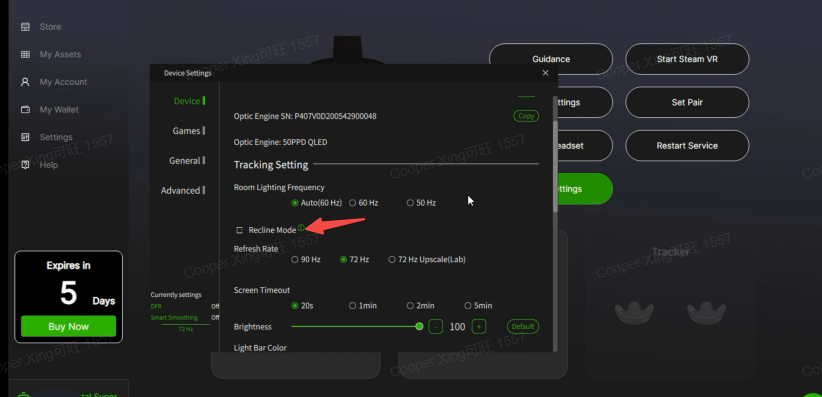 After disabling this option, the headset should immediately restore full position and orientation tracking (6DoF).
- Additional Note:
- "Reclined Mode" is designed to provide a stable viewing experience when you are leaning back or lying down. In this mode, some tracking functions are intentionally limited. If the issue persists after turning off this mode, or if you need further assistance, please feel free to contact our technical support.