
Choose Your Play Area
The chosen play area must have enough space to ensure that when you extend your arms while holding the controllers, you will not touch walls, ceilings, or surrounding objects. Make sure there are no steps or windows within the play area, and remove all obstacles, including pets!
Standing-scale or seated positions require less space.
POSITION OF BASE STATION
Please keep the distance is more than 1.5m between the headset and base station when you are playing the game, or the tracking will be lost. Please also ensure that the height of the base station is about 2m.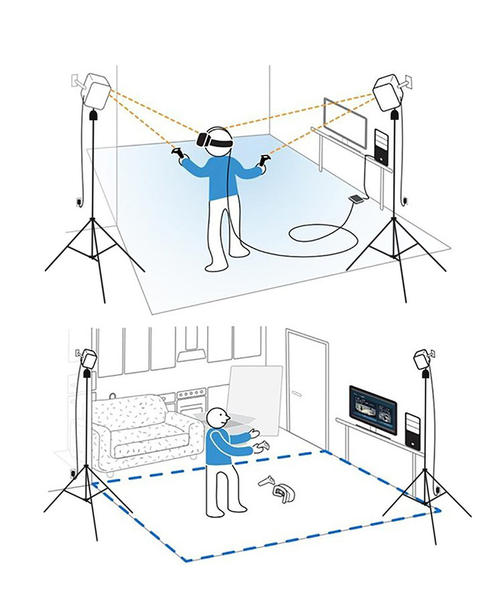
For accurate tracking, make sure that any locator is within 7 meters (23 feet) of the head mounted device and control handle. Make sure that there are no physical obstacles (such as protruding shelves, mirrors, etc.) in the position where the positioner is placed, so as to completely cover the field of view of the positioner and ensure that the signal is not blocked.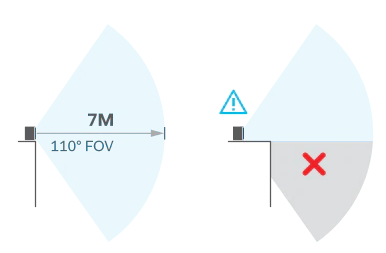
Steam VR 2.0 / Index:
- You could set 16 different channels for VIVE 2.0 or Index base station.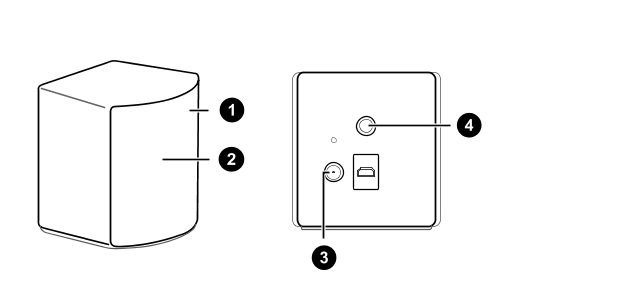
1.Status Indicator Light
2.Front Panel
3.Power Port
4.Threaded Mounting Hole
Configure Base Station Channels
If you are using more than two SteamVR Base Stations 2.0 in your play area, you can change the channels of the additional base stations.
Important: In the SteamVR application, make sure to enable Bluetooth under > Devices > Bluetooth Settings.
On your computer, open the SteamVR application.
Click ☰, then select Devices > Base Station Settings.
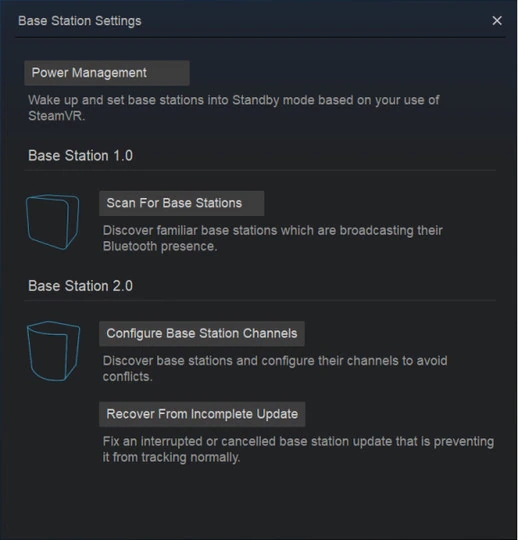
Under Base Station 2.0, click Configure Base Station Channels. SteamVR will automatically scan for base stations in your play area. Once completed, a list of base stations will appear. If any base station is not detected, click Scan More.
To change its channel, click on the base station link. Select an unused channel, then click Apply.
Tip: You can also click Auto-Configure to let SteamVR assign the channels.
If you are prompted that a channel conflict exists, click Continue to resolve this error.
After completing the changes, click Done.
SteamVR 1.0 Base Station Channel Settings
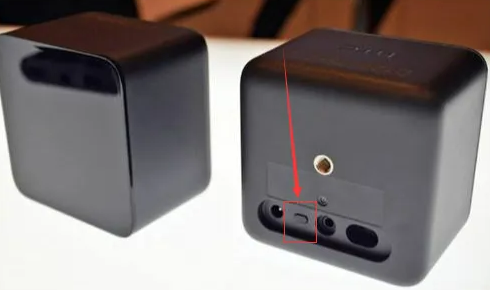
Without using a sync cable:
Press the channel button on the back of the first base station and set it to channel "b" .
Set the other base station to channel "c" .
Using a sync cable (recommended for better stability):
Set one base station to channel "A" .
Set the other base station to channel "b" .
⚠️ Note: Once the base stations are powered on, do not move or adjust their angles, as doing so may interrupt tracking and require you to set up the play area again.