The VR image stutters, lags, or fails to follow head movement in time. How should I troubleshoot this?
Print
Modified on: Tue, 3 Nov, 2026 at 4:45 PM
A: Please check the following steps one by one:
Check hardware connections: Make sure the cable is connected to a USB 3.0 port, and that the DP connector is not loose, damaged, or poorly connected.
Check system performance: Confirm whether the PC's CPU and GPU are within the officially recommended configuration list, and check their usage rates as well as memory usage. You can use the dashboard feature added in Pimax Play 1.43 to view these metrics. Reference video: https://youtu.be/bASF45jQ04wIf FPS is too low, the PC may lack performance or the resolution may be set too high. Adjust accordingly.
Check driver settings: Use DDU to uninstall the graphics driver, then reinstall a relatively stable driver version. Restart the PC and check whether the issue improves. DDU tutorial: https://youtu.be/tKVdxgVzC0k
Check image quality settings: Set the OpenXR Runtime to Pimax OpenXR, adjust image quality, and confirm whether the issue persists when the game runs close to full frame rate. For how to switch the runtime, refer to the image abnormality instructions.
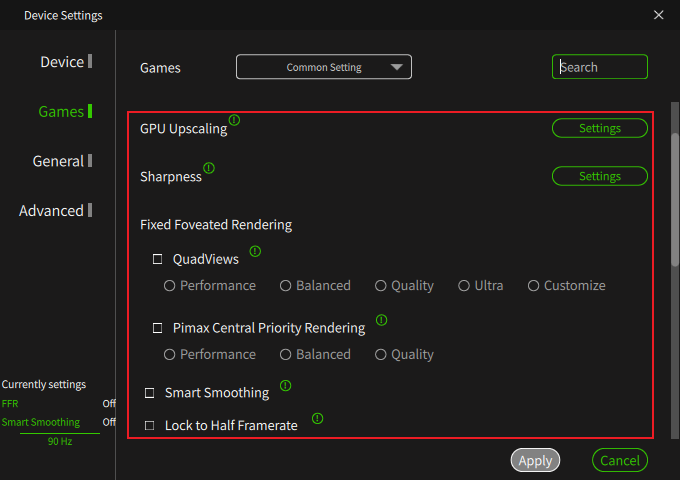
Check rendering settings: Turn off Quad Views, Smart Smoothing, IPD Offset, Vertical Offset, and other settings, and observe whether this helps.
Confirm the scope of the issue: Check whether the problem occurs on all screens, including the headset's Home (starry sky interface). If it occurs only in specific games, investigate game compatibility.
Check the usage environment: Confirm that the correct indoor lighting refresh rate is selected in the client, and check whether the play area has reflective objects such as mirrors or glass windows, or lighting that is too bright or too dim. These can cause tracking anomalies and resulting stutter.
Check RGB peripherals: Confirm whether the user is using RGB peripherals. If so, try turning them off and test again.
Did you find it helpful?
Yes
No
Send feedback Sorry we couldn't be helpful. Help us improve this article with your feedback.
