Games or software crash while using the Dream Air. How should I troubleshoot this?
Print
Modified on: Tue, 3 Nov, 2026 at 4:50 PM
A: First identify how the crash presents itself, then follow the corresponding steps.
Types of symptoms
Game closes, headset stays connected: The game image switches directly back to the Pimax Play Home screen, and Pimax Play still shows the headset as connected.
Game closes, headset disconnects: The screen goes black, Pimax Play shows the headset as disconnected, and it reconnects after a while, showing Home.
The entire system crashes or freezes.
Troubleshooting steps
Switch the OpenXR Runtime:
In the OpenXR Runtime settings, try using Pimax OpenXR;
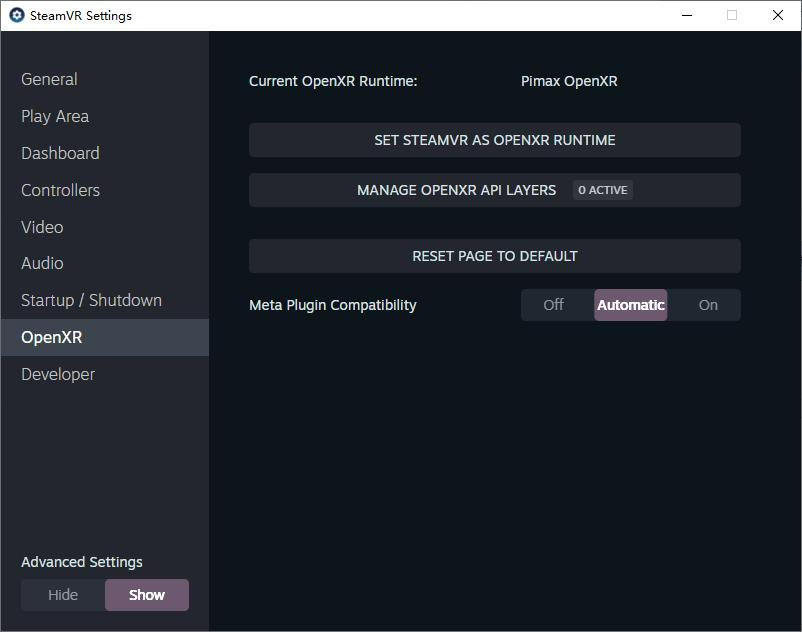
If the game was downloaded from Steam, try switching to the SteamVR Runtime: open SteamVR, click Settings, and change the Runtime in the OpenXR-related settings.
Did you find it helpful?
Yes
No
Send feedback Sorry we couldn't be helpful. Help us improve this article with your feedback.
