The Pimax controller does not charge properly after being connected to a charging device. What should I do?
Print
Modified on: Tue, 3 Nov, 2026 at 4:57 PM
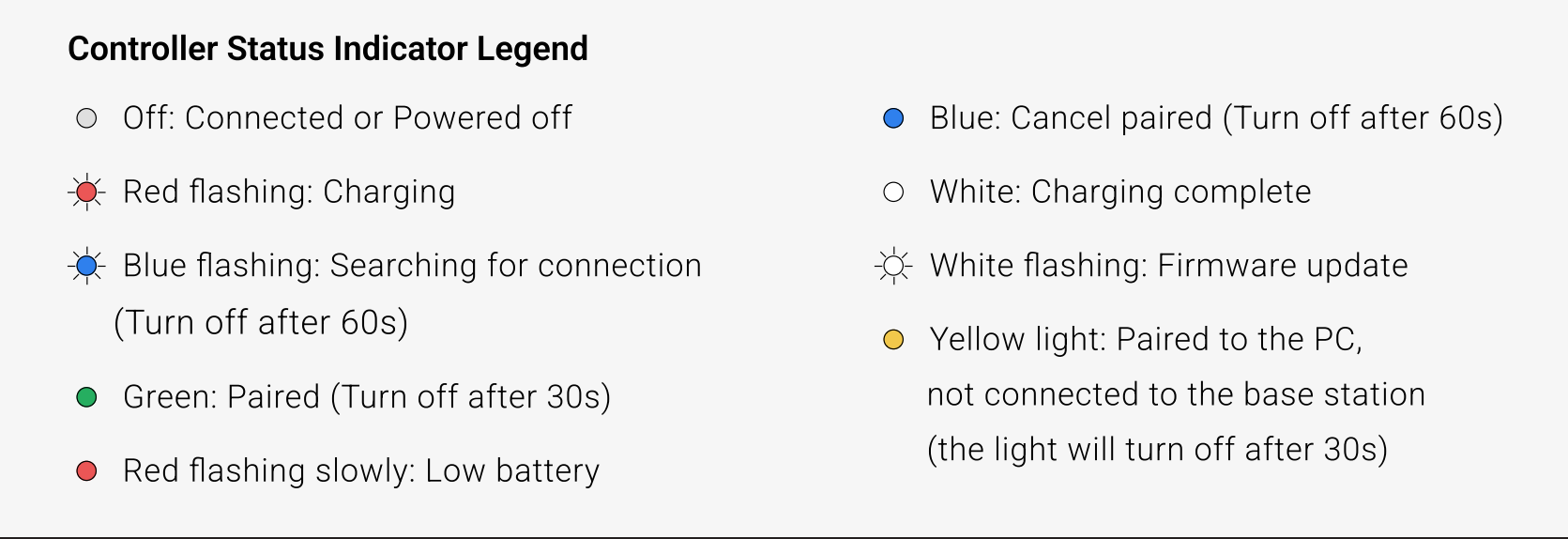
A: Symptoms include: after connecting the controller to a charging device, it does not charge properly, there is no charging indicator feedback, and the battery level never changes. Some users report that the indicator keeps flashing red after connecting to charge, and the battery level stays at a low level (such as 7%) for a long time without change, even after charging for more than 5 hours, while the controller can still connect to the headset and show a low-battery warning. It may also be described as "won't charge," "battery level won't go up," or "no response when plugged in."
Troubleshooting steps
Reset the controller and check battery level: Press and hold the controller's π button to reset it. Afterward, check the battery level display to confirm whether a temporary fault caused the charging failure.
Test with a different charging cable: Replace the cable with a known-good cable compatible with the controller, reconnect it to the charging device, and observe whether the controller charges normally to check whether the original cable is damaged.
Test with a charger of the correct specification: Use a genuine charger rated 5V/2A or below together with a confirmed working USB charging cable. Charge the controller for at least 30 minutes and observe whether the indicator status and battery level change, ruling out insufficient power supply or cable issues.
Troubleshoot controller hardware failure: If the controller still does not charge after replacing the cable, using a correct-specification charger, and resetting the controller, the controller itself is likely faulty (charging port, battery, or circuit issue). Please contact official after-sales for inspection or replacement.
Did you find it helpful?
Yes
No
Send feedback Sorry we couldn't be helpful. Help us improve this article with your feedback.
