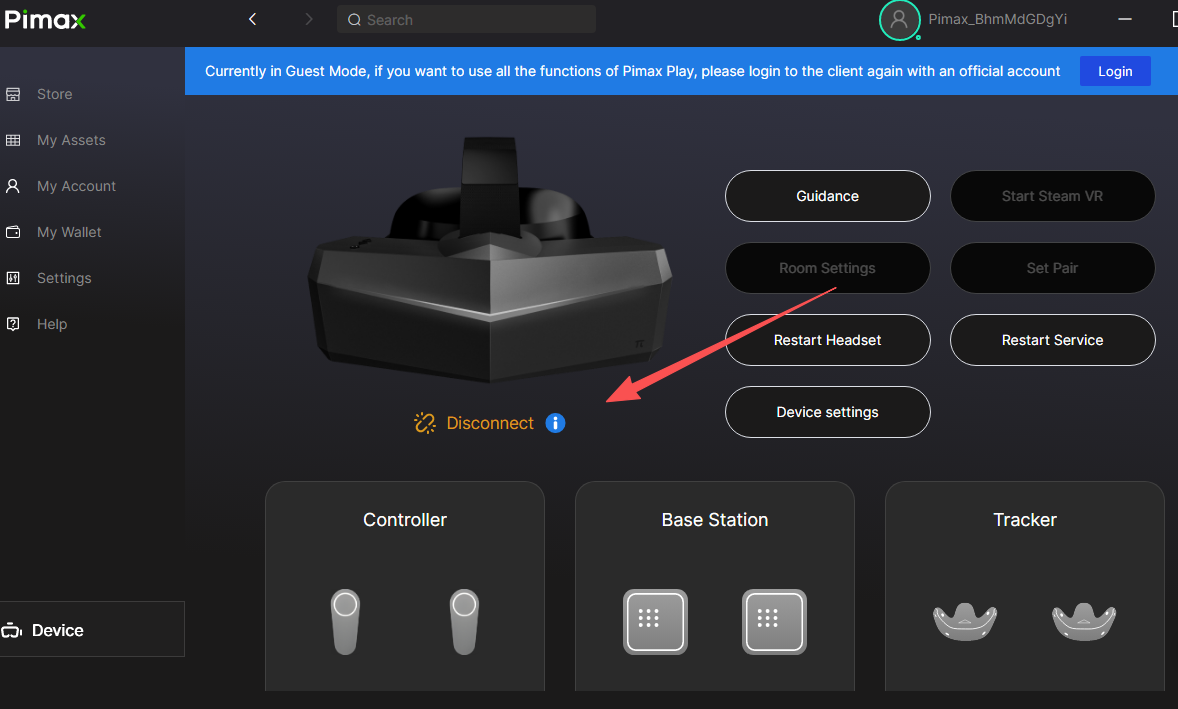
Open the Pimax Play main interface, then click the blue icon next to "Device Not Connected" .
II. Error Code 105XX
1. Error Code 10500
Possible Cause:
The USB connection between the headset and PC is not being recognized.
Solutions:
Make sure the USB connector on the DP cable is plugged into a USB 3.0 or higher port on your PC.
If using a laptop, verify that the port supports direct GPU output (discrete graphics mode) and that any adapter you are using supports DP 1.4.
Ensure the DP cable is fully inserted into the headset and has not come loose (see image below).
If the headset power indicator is red:
This typically means the Prime service entitlement associated with the current device has expired or has not been properly activated.
Error code 10517
Cause: USB failed to read device information
Solution: Restart the headset and restart the computer
Error code 10518
Cause: Abnormal positioning information of the headset
Solution: Delete the directory (%programdata%\pimax\slam) and restart the service
Error code 10600
Cause: Graphics card DP is not recognized/using a high-resolution or refresh rate monitor
Solution:
· Please make sure that the DP port of the data cable is connected to the DP port of the independent graphics card
· Please make sure that the DP cable on the head display is plugged in tightly and not dislocated (as shown below)
· Graphics card driver problem, please update the driver from the graphics card's official website
· Lowering the resolution and refresh rate of the monitor
Error code 10632/10636
Cause: Graphics card or DP cable problem
Solution:
· Re-plug the display cable
· Install the graphics driver
· Restart the operating system
Error code 10900
Cause: The helmet DP port is connected to the integrated graphics card/the graphics card does not support direct connection mode/the graphics card driver is too old
(The Type-C port on the laptop does not support graphics card signal transmission)
Solution:
· Plug the helmet display device into the independent graphics card
· Replace the graphics card driver
· Check the graphics card model and confirm whether it is lower than the minimum graphics card requirement
· For laptops, please contact the merchant to confirm whether the Type-C interface supports direct output of the graphics
Error code 10932
Possible Causes:
Graphics card or DP cable issue
Dual‑GPU system unable to connect properly
Solutions:
Reconnect the DP cable – Unplug and firmly reinsert the DP cable.
Dual‑GPU systems: Connect both the headset’s DP cable and your monitor’s display cable to the same graphics card.
Error code 10933
Possible Cause:
The device is already in use.
Solutions:
Unplug and reinsert the DP cable.
Try a different DP port, or restart your computer.
Error code 10934
Possible Cause:
Integrated graphics (iGPU) detected.
Solution:
Enter your motherboard BIOS settings (not Device Manager) and disable the integrated graphics (iGPU) .
Error code 10935/10936
Cause: Unable to initialize the HMD screen
Solution:
· Replace the data cable or DP port
· Reinstall the latest Pimax Play
Error code 10938
Cause: Exceeding the graphics card bandwidth
Solution:
· Remove extra display devices
· Reduce display resolution and refresh rate
Error code 20XXX
a. Error code 20000
Cause: USB not recognized when connecting the headset to the computer
Solution:
· Re-plug the USB
· If there is a problem with the operating system USB driver, you can try to uninstall the driver and download the driver from the motherboard official website.
Error code 20100
Cause: Pimax Play file installation error
Solution: Reinstall the Pimax Play
Error code 20300/20400
Cause: Headset device acquisition failed
Solution: Restart the client and reinstall the client
Error code 20800
Cause: VR service connection failed
Solution: Restart the service
Error code 29001
Cause of failure: Pimax Play internal data communication is abnormal
Solution: Restart the service
Error code 30XXX
a. Error code 30000
Cause: Pimax Play service is abnormal
Solution: Restart the client and reinstall the Pimax Play
Error code 30101
Cause: Algorithm problem
Solution: Delete the directory (%programdata%\pimax\slam) and restart the service
Error code 30202/30204
Cause: Pimax Play and headset communication abnormality
Solution: Please wait. If the waiting time is too long, please restart the headset and restart the service.
Error code 30205
Cause: Communication between Pimax Play and the headset timed out
Solution: Restart the computer or reinstall the Pimax Play
Uncommon Error Codes:
Error Code: 11120
Possible Causes:
Solution:
Update your graphics card driver.
Error Code: -1
Solution:
Please try the following steps in order:
Restart your computer.
Reinstall the Pimax Play client.


